

Reels Trending Ads place a brand immediately after Reels that are already trending, giving advertisers a way to appear alongside content attracting significant attention at that moment. Rather than treating Reels as another placement inside a broader campaign, the format has its own buying, campaign and content-selection requirements.
That makes campaign structure important. Marketers need to decide what trending content they want to appear alongside, organise the appropriate ad sets, reserve inventory and prepare creative that feels natural in the Reels environment.
What Are Reels Trending Ads
The basic placement is straightforward: a person watches top-trending Reels content, and the Reels Trending Ad appears immediately afterwards. Eligible content is selected from trending Reels while applying Meta's brand suitability controls.
Advertisers can either run alongside trending content broadly or choose topical lineups that give the campaign greater contextual relevance.
Before You Build the Campaign
Several campaign requirements need to be settled before setup begins.
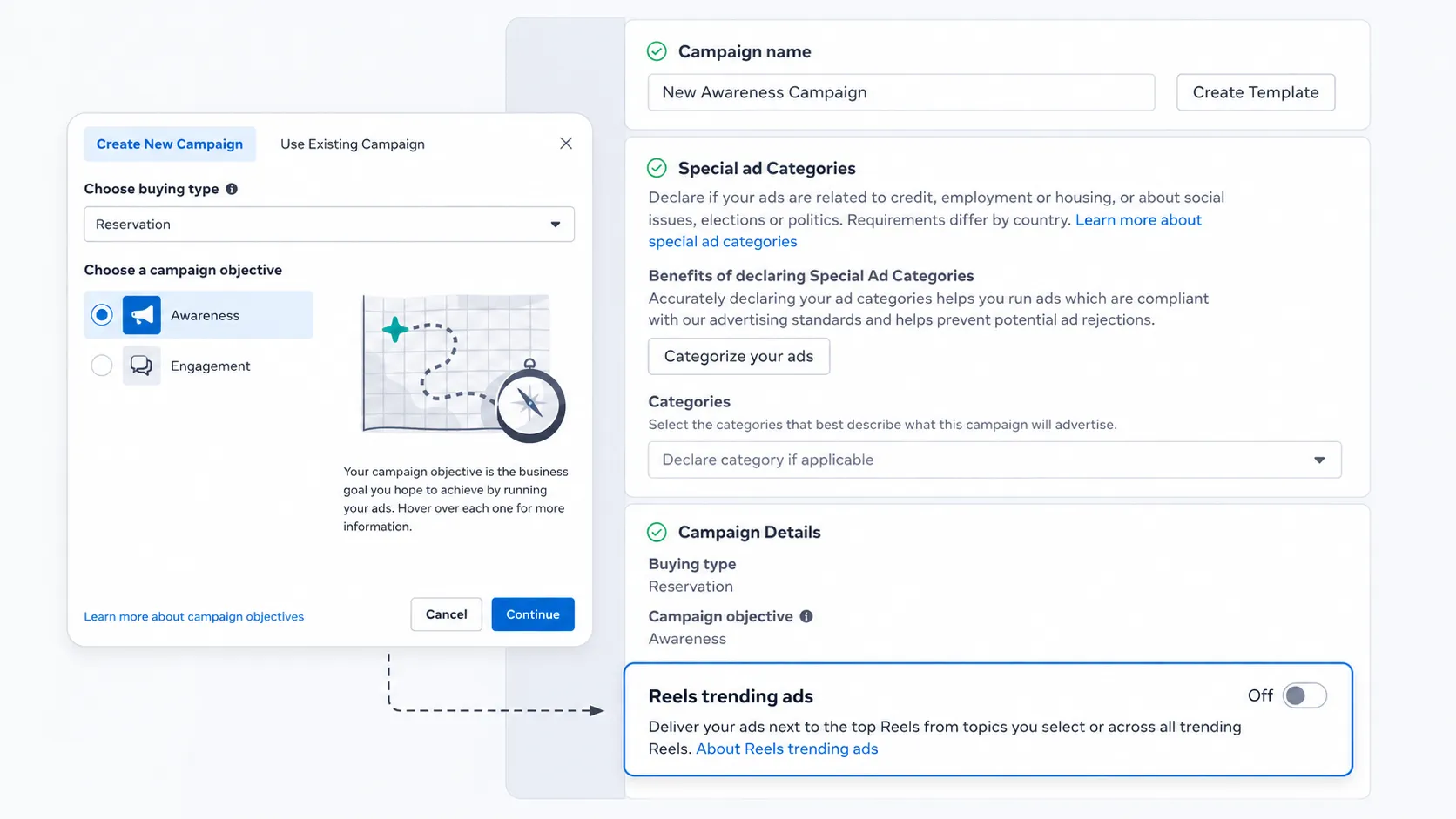
Reels Trending Ads use Reservation as the buying type and Awareness as the campaign objective. Delivery is limited to Reels, and the account needs access to the format before the campaign can be created.
Audience planning also matters. Reservation buying means inventory and delivery are planned around defined campaign parameters rather than being left to an always-on auction campaign. Inventory can be booked in advance, so marketers running around a launch, event or other fixed date should avoid leaving the reservation until the last minute.
Creative should be prepared at the same time. Having multiple Reels-ready videos gives the campaign enough creative variety without forcing teams to adapt unsuitable assets immediately before launch.
Step 1: Create the Reels Trending Ads Campaign
Create a new campaign and select Reservation as the buying type. Choose Awareness as the objective, then switch on Reels Trending Ads at campaign level.
The campaign-level setting is significant because Reels Trending Ads are not simply another placement to tick alongside Feed, Stories or standard Reels inventory. Activating the format establishes the campaign as a Reels Trending Ads campaign and enables the content-selection options used at the next stage.
Step 2: Choose All Trending Reels or Topical Lineups
Advertisers have two main ways to organise where their ads appear.
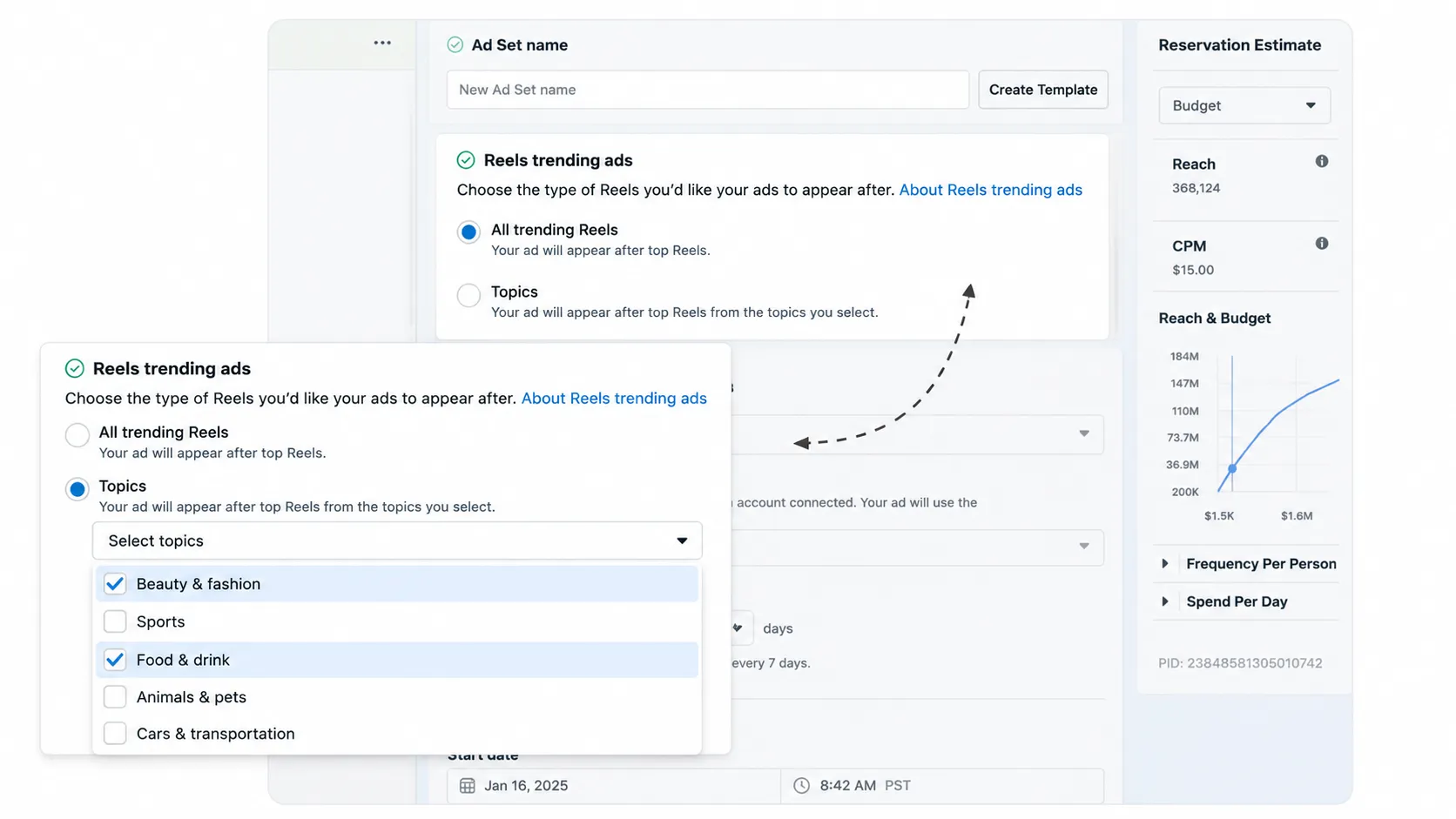
All Trending Reels provides broad access to eligible top-trending content. Topics narrow that selection to particular content categories, allowing the campaign to align more closely with subjects relevant to the brand.
Available categories include areas such as animals and pets, beauty and fashion, cars and transportation, food and drink, sports, music, business and finance, travel, and TV and movies.
A campaign can contain multiple ad sets, making it possible to organise different topical selections separately. This is useful when the media team wants clearer control over topic-specific delivery or needs a cleaner reporting structure later.
Step 3: Configure the Ad Set
With the content approach selected, move to the ad-set settings and define the audience, schedule and reservation.
Audience choices should reflect both campaign reach and relevance. Overly restrictive targeting can reduce the available audience, while a broader audience gives the reservation more room to deliver.
Set the campaign dates and review the reservation estimate before confirming the ad set. If several topics are being used, organise them deliberately rather than creating ad sets without a measurement purpose. A structure such as Beauty & Fashion in one ad set and Sports in another can make subsequent topic-level analysis easier.
Dashboard screenshot — Page 25: Capture the ad-set interface, including audience, schedule and reservation estimate. Place it immediately after the configuration explanation so readers can connect each setting with the interface.
Step 4: Build the Reels Ad
At ad level, select the identity that will represent the advertiser and add the video creative.
Use a single-video Reels execution designed for vertical viewing. Repurposing an existing asset can work when it already fits Reels conventions, but simply resizing a horizontal or feed-first advertisement does not make it Reels-native.
Prepare several suitable videos before launch. This provides creative variety while reducing the need to make rushed changes after the reservation is already underway.
Dashboard screenshot — Page 26: Use the portion showing identity, ad creation and video creative setup.
Step 5: Check Brand Suitability
Trending content can move quickly, which makes suitability controls especially relevant for this format.
Reels Trending Ads use Meta's stringent brand suitability approach, with eligible surrounding content falling within its Limited Inventory framework. This is designed to give advertisers access to trending Reels while applying tighter controls to the content their ads can appear beside.
Brand suitability should therefore be reviewed during setup rather than treated as a post-launch check.
Dashboard screenshot — Page 28: Show the brand suitability and Limited Inventory controls. Keep the relevant control labels visible because the interface communicates this setting more clearly than a generic brand-safety illustration.
Step 6: Prepare Reels-Native Creative
Three requirements form the starting point for Reels creative:
- 9:16 vertical video
- Audio
- Safe-zone compliance
From there, creative choices determine whether the advertisement feels like it belongs in the viewing experience.
Give people a reason to keep watching within the first two seconds. Quick edits and transitions can help maintain pace, while audio should contribute to the story rather than simply playing underneath it. Text overlays can communicate important information quickly, provided they remain inside safe zones and do not overwhelm the video.
Human presence is another useful Reels-native element. Showing a person using, demonstrating or reacting to a product can often fit the surrounding content more naturally than an execution built entirely around polished product shots.
Optional supporting visual — Pages 30–31: Use the creative guidance showing 9:16 execution, audio, safe zones, early hooks, transitions, text overlays and human presence if the article needs a visual example beyond the Ads Manager walkthrough.
Step 7: Launch and Monitor the Campaign
Complete a final check of the audience, reservation, campaign dates, topical selections and creative before launch.
Once delivery begins, don't stop at campaign-level totals. Reels Trending Ads reporting can be broken down by Reels Trending topic, providing a clearer view of how delivery is distributed across the content categories included in the campaign.
That breakdown becomes particularly useful when several topical lineups are running because marketers can analyse the campaign structure they created during setup rather than treating all trending inventory as one pool.
Dashboard screenshot — Page 27: Use the Reels Trending topic reporting breakdown. Position it here rather than earlier in the setup sequence, since readers will understand the reporting fields better after seeing how topics are organised.
Measure Brand Lift Properly
Standard delivery metrics explain what the campaign delivered, but they do not necessarily show whether the advertising changed how people think about the brand.
Brand Lift testing can help measure that incremental effect. The measurement structure can separate the broader media campaign from the Reels Trending Ads flight, allowing marketers to examine outcomes associated with the trending placement rather than looking only at combined campaign performance.
Measures can include ad recall, brand favorability and consideration, depending on the study design.
Pre-Launch Checklist
Before confirming the campaign:
- Buying type is set to Reservation
- Campaign objective is Awareness
- Reels Trending Ads are enabled at campaign level
- All Trending Reels or the required topical lineups have been selected
- Separate ad sets have been created where topic organisation requires them
- Audience size and targeting have been reviewed
- Campaign dates and reservation estimates are confirmed
- Multiple Reels-ready videos are available
- Creative is 9:16, uses audio and respects Reels safe zones
- Brand suitability controls have been checked
- Topic-level reporting and Brand Lift measurement are prepared where required
Optional closing visual — Page 38: Use the existing campaign checklist if a final reference graphic would be more useful than the creative visual from pages 30–31.
For a six-screenshot article, prioritise Pages 22, 23, 25, 26, 28 and 27, in that editorial order. Together, they create a clean visual journey from campaign creation and topic selection through ad-set configuration, creative setup, suitability controls and post-launch reporting.